
Optimizing Photogrammetry for Virtual Reality
Carleton Immersive Media Studio (CIMS) has created many high detail meshes using photogrammetry that create an accurate record of the existing condition of objects, surfaces, buildings, and topography. As seen in the blog post, Photogrammetry of the Artifacts in the Senate Tour, photogrammetry of artifacts find a place in public dissemination projects like the Senate Virtual Tour. The meshes of the objects come to life as the viewer can see the artifact from all sides as it rotates. The virtual tour on the web jumps out at you, and the artifacts come to life.
For web applications, animations are created of the meshes; however, there is potential to use the objects in a more engaging way, such as using video game engines and virtual reality. Artifacts can be added to immersive virtual experiences as Real-time Graphics, adding additional detail to the digital model and allowing the virtual visitor to interact with the object.
Unfortunately, the meshes, as they are exported from the post-processing photogrammetry software, are too dense in polycount to operate within the virtual space in high fidelity. In rendered animations found in static visualizations on the web, the renderings may take hours to generate. Within the virtual experience, especially in virtual reality, which requires a frame rate of 90 frames per second, the object must be rendered in a fraction of a second. If this frame rate is not achieved, the immersion and enjoyment is drastically reduced due to screen tearing and distortions that induce discomfort and nausea. Both the Oculus and Steam Marketplaces have a rating for their VR experiences for “Comfort” with a low rating affecting the interest of potential buyers and users.
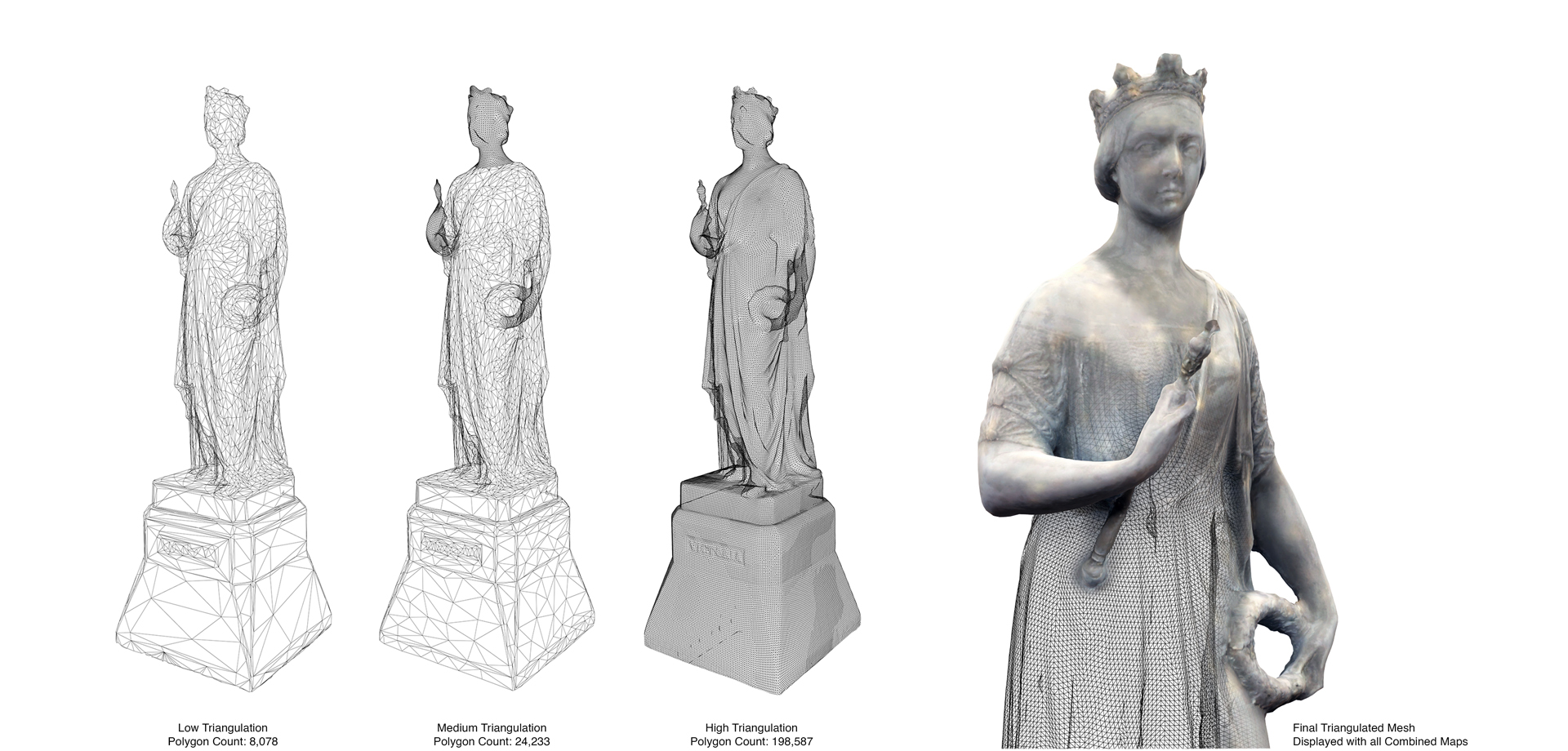
To achieve the desired frames per second, the photogrammetric meshes CIMS creates need to be simplified. For best results, CIMS uses multiple software that leverages powerful algorithms to analyze the mesh and remove unneeded detail. CIMS has used a combination of Photoscan and InstaLOD to process the meshes.
Next, the textures created from the photographs that generated the photogrammetric mesh are examined, and light spots or hard shadows are removed through a process called de-lighting. By removing the existing lighting effects on the images, the meshes can be lit in the new virtual environment.
Albedo maps, Normal Maps, and Occlusion maps are generated and added to the model to simplify the geometry further while maintaining a high level of detail. The Albedo map is generated from the process of de-lighting and is the base colour input. The Normal map simulates how lighting interacts with the original model and by applying the illusion of shadows. Normal maps replace small geometric details within the mesh, providing the illusion of depth. An Occlusion map simulates shadows onto the surfaces without the requirement for them to be generated in each rendered frame. The three maps added to the optimized mesh produce a highly detailed model that is also suitable for Real-time Graphics.

An additional challenge in processing the photogrammetric mesh for a game engine and virtual reality is ensuring the scale and location of the mesh is correct for the virtual environment. When processing in PhotoScan, the meshes have no scale or position. They need to be scaled and located to their appropriate X, Y, Z coordinates. To provide the scale and location of the mesh, a minimum of three points are marked on it, which are scaled and positioned to three similar points in the virtual environment.
The last step is to import the photogrammetric mesh into a game engine, such as Unity 3D, as an FBX file to maintain its texture attributes. With the scale and location corrected, the object will import correctly and the texture is applied. An example of the final outcome can be seen in the House of Commons Foyer’s Frieze. The Mesh was greatly reduced in polycount with albedo, normal, and occlusion maps adding additional detail that had been removed from the actual geometry. By reducing the density of the mesh while maintaining a high-quality texture, the photogrammetric meshes allow for their inclusion in virtual environments without slowing down the experience.